The Blood Pressure Tab
Tap [Blood Pressure] to enter the blood pressure tab. On the blood pressure tab you can:
- View your blood pressure readings
- Enter blood pressure readings
- See which days you have taken readings in the past
- See which days blood pressure readings are required as part of your measurement week
View your blood pressure readings
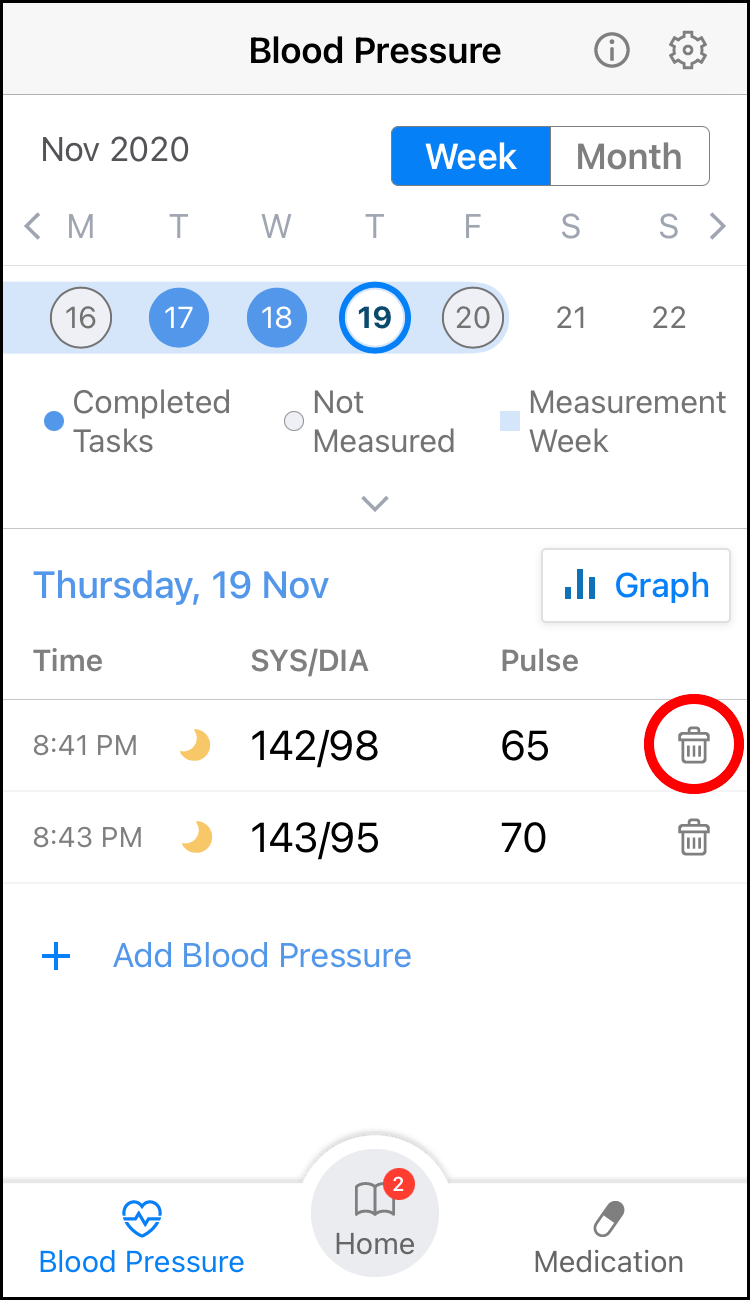
- Tap a date in the calendar to view your blood pressure readings from that day.
- Use the week / month toggle button at the top of the screen to switch between a 7-day and full month view.
- Dates with a dark blue filled circle mean that a blood pressure measurement has been recorded on that date.
- Dates with an unfilled circle mean that no blood pressure measurement has been recorded on that date.
- Dates highlighted with a light blue bar are part of your measurement week. You should aim to take blood pressure measurements on these days (see "Your Measurement Week" page).
- Dates with no highlight are not part of your measurement week. You may still wish to measure and record your blood pressure on these days in order to keep track of your health.
- All blood pressure data entered into hypertension plus is shared with your doctor.
- Tap [Graph] to show graph view of your blood pressure readings. In the graph view, tap [Week] to show each blood pressure reading in the week. Tap [Month] to show the average of your blood pressure reading of each week in the month. Tap [Year] to show the average of your blood pressure reading of each month in the year.

- To delete a reading, tap
 .
.
Note
- Only delete readings that have been entered in error. Data cannot be recovered after deletion. Do not selectively delete data to influence the blood pressure result as this may lead to incorrect decisions from your doctor.
Use the calendar to select the date for which you would like to add a blood pressure measurement and tap "+" to open the "Add Blood Pressure" screen. Complete the data when prompted. Refer to "Measure Blood Pressure Task" page for further guidance on adding blood pressure results.